
From time to time the Click Once cache that is used to deploy our solutions can corrupt a file that stores some local data information (such as position on screen etc).
When this occurs our software fails to launch (it starts to open but automatically closes) or the follow error prompt is displayed

To clear this problem:
- Close the application if it did open (you may need to use Task Manager to force close the process)
- Open Windows Explorer
- Navigate to the current User Folder (c:\users\{username})
- Locate the AppData folder and open it (note, if you are unable to see this folder, you may need to turn on 'hidden items' from the View toolbar)
- Open the 'Local' folder, then 'Apps' folder and finally the '2.0' folder, you should have a couple of folders in this directory as per below (please note, the folder names are randomised by Microsoft so yours may not match 100% with the example below)
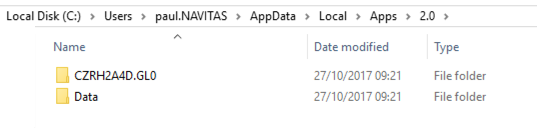
- Delete the 'Data' folder
You can now restart the application and it should start to work as expected.
Comments
0 comments
Please sign in to leave a comment.