
Our off the shelf products are available using two different deployment types:-
- Click Once
- XCopy
Under normal circumstances the Click Once deployment is the preferred method as this automatically performs the installation for agencies, and also manages the download and update of our software when new versions are released.
Some Agencies have an environment that is not compatible with 'Click Once' deployment and may choose instead to use the XCopy ZIP file supplied on our website. This version requires the IT Team to download and unzip the applications and manually deploy them to each set or server within their environment. This deployment is typically used in a Citrix or Terminal Services environment where the agency doesn't want the software install for each individual and instead needs one version on the server that all users have access to. When new versions are release, the IT Team must manually download the latest versions and deploy them for their users.
To Check Which Version you are running
Most IT Teams will be aware if they are running a Citrix or Terminal Services environment where they are responsible for the deployment and management of software, a quick way to check is for a user to Navigate to the C:\Navitas folder on their computer and look for any 'appref-ms' or 'Application Reference' files,
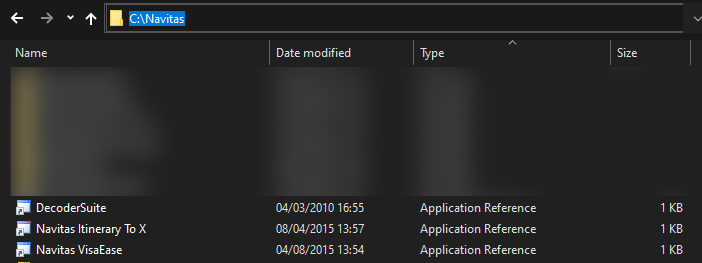
Here we can see that within the C:\Navitas folder, Decoder Suite, Navitas I2X and VisaEase all have Application Reference files - which means they have been deployed using the 'Click Once' versions of our software.
If your folder instead has for example a Decoder Suite folder, then the software has been deployed using the 'XCopy' version of our software.
Further Help
If your agency doesn't have a C:\Navitas folder, then you may still be using the ClickOnce version of the software directly referenced in the Window Start Menu - to check, click the Start Menu and search for one of our solutions, for example Decoder Suite
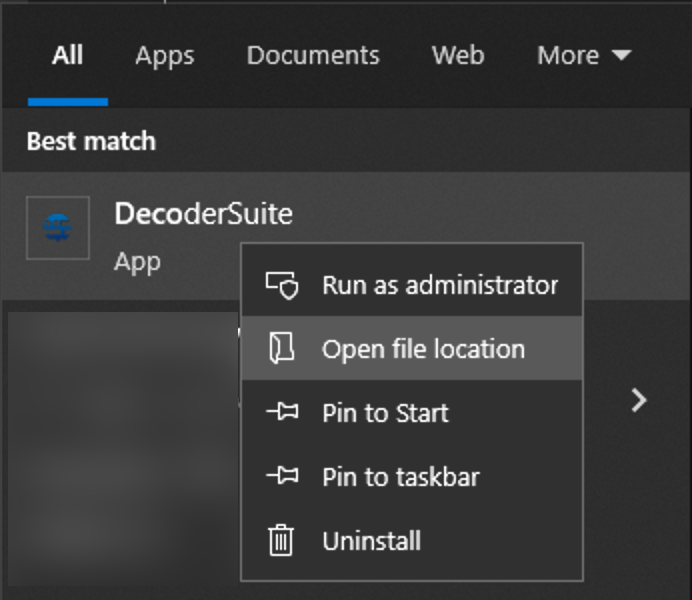
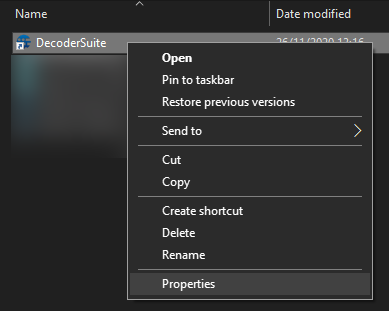
Then Right Click on the Application Name and select, 'Open File location' from the menu, then right click on the file in the Windows Explorer window that opens, and select 'Properties' from the menu that appears,
On the 'Properties' window, check the 'Type of file' listed,
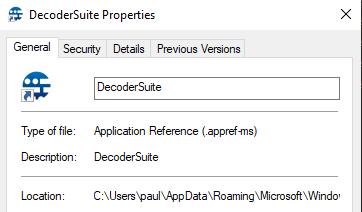
If it say 'Application Reference (.appref-ms)' then your agency is using the 'Click Once' versions of our software. If the Type of file says 'Application' then your agency is using the 'XCopy' versions of our software. The 'Properties' windows provides information as to where the application is been deployed to when using the XCopy versions, in the Target Location field
Comments
0 comments
Please sign in to leave a comment.